

Description
Brushed Metal Chrome Theme with Transparent Title Bar
Overview
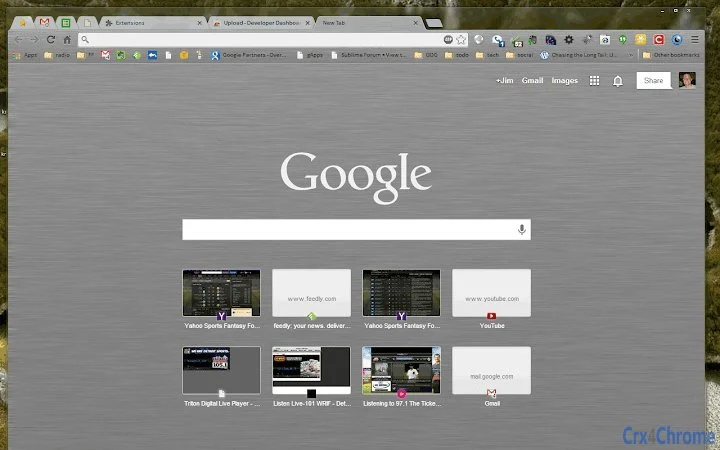
The Brushed Metal theme for Google Chrome is designed to enhance the visual experience of users on Windows systems that support the Aero transparency effect. By integrating a transparent title bar, the theme blends seamlessly with the operating system’s native aesthetic, offering a refined and modern interface. This utility targets users who value visual consistency and a polished desktop environment, particularly those using Windows with transparent window effects enabled.
It serves as a lightweight customization tool that modifies the appearance of the Chrome browser without altering core functionality. The theme is ideal for professionals and enthusiasts who prioritize aesthetics in their daily workflows, such as designers, developers, and power users who spend extended time in the browser. It is especially suited for individuals who have customized their Windows desktop with Aero themes and seek a cohesive look across all applications.
While the developer did not provide additional background information, the theme’s focus on visual integration suggests a targeted approach to user experience. Its primary purpose is to elevate the browser’s appearance by aligning it with the system’s design language, offering a subtle yet impactful upgrade to the standard Chrome interface.
Key Features & Capabilities
- Transparent Title Bar – The theme applies a transparent header to the Chrome window, matching the Aero theme on Windows systems. This creates a visual continuity between the browser and the desktop environment.
- Brushed Metal Aesthetic – Features a sleek, metallic finish that adds a premium visual touch to the browser interface, enhancing its overall appearance.
- Windows Aero Compatibility – Designed specifically for Windows systems that support transparency effects, ensuring the theme functions as intended on compatible setups.
- Lightweight Integration – With a file size of 1.2 MB, the theme is minimal in resource usage and installs quickly without affecting system performance.
- Easy Application – Users can apply the theme directly through Chrome’s theme settings, requiring no technical expertise or additional tools.
Real-world usage includes users who want a more immersive browsing experience by reducing visual clutter at the top of the screen. For example, a designer working on a high-resolution canvas may appreciate the reduced visual barrier when using Chrome for reference or research. Similarly, a developer using multiple windows might benefit from a cleaner, more integrated interface that aligns with their desktop theme.
User Interface, Workflow & Performance
The user interface of the Brushed Metal theme is entirely visual, focusing on the appearance of the Chrome window’s title bar and borders. It does not introduce new controls or modify navigation elements. Instead, it enhances the existing interface with a refined look that matches the system’s transparency settings.
Navigating the theme is straightforward—users access it through Chrome’s built-in theme manager, where they can preview and apply it instantly. The workflow is efficient, requiring minimal steps to implement the visual change. No additional configuration is needed, making it accessible to users of all experience levels.
Performance details were not specified by the developer. However, given its small size and non-invasive nature, the theme is expected to have negligible impact on system resources. The developer did not specify resource usage details, and performance observations are based on general software behavior patterns. Stability is presumed to be high, as the theme operates within Chrome’s standard extension framework and does not alter core browser processes.
Compatibility & System Requirements
The theme is compatible with Windows operating systems that support the Aero transparency effect. This includes Windows 7, Windows 8, and Windows 10 with the appropriate visual theme enabled. The software version is 1.0, and the installation size is 1.2 MB.
Exact system requirements were not listed. Compatibility information was partially provided, and the theme relies on the operating system’s native transparency capabilities. Users are advised to ensure their Windows theme is set to a transparent (Aero) style for optimal results. The developer did not specify minimum hardware requirements or CPU/RAM behavior.
Pros and Cons
Pros
- Enhances visual consistency with Windows Aero themes
- Minimal file size and low resource usage
- Simple one-click installation via Chrome settings
- Offers a premium, brushed metal look without added complexity
- Perfect for users seeking a clean, modern browser interface
Cons
- Only functional on Windows systems with Aero transparency enabled
- Does not provide functional improvements beyond visual design
- Limited to Google Chrome; not compatible with other browsers
- Developer information was not provided
- No customization options beyond the default theme
FAQ Section
Is this theme compatible with all Windows versions?
The theme is designed for Windows systems that support the Aero transparency effect. This includes Windows 7, 8, and 10 with the appropriate visual theme enabled. Compatibility with newer Windows versions is not confirmed.
Can I use this theme without a transparent desktop theme?
For the transparent title bar to function correctly, the system must be using a transparent (Aero) theme. Without it, the transparency effect will not appear, and the theme will display with a standard opaque bar.
Is the theme safe to install?
Yes, the theme is a standard Chrome extension and is distributed through official channels. It does not require administrator privileges and does not collect user data.
How do I update the theme?
Chrome automatically checks for updates to installed themes. Users will receive updates when available, provided the theme remains in the Chrome Web Store.
Can I use this theme offline?
Yes, once installed, the theme can be used without an internet connection. However, initial installation requires an active connection to download the theme from the Chrome Web Store.
Final Thoughts
The Brushed Metal theme for Google Chrome delivers a focused, visually appealing enhancement for users on compatible Windows systems. Its ability to integrate with the Aero transparency effect provides a seamless, modern look that elevates the browser’s appearance without sacrificing performance. While it does not offer functional upgrades, its aesthetic value is significant for users who prioritize a cohesive and polished desktop experience.
Designed for professionals and enthusiasts who value design consistency, this theme stands out as a lightweight yet effective tool for personalizing Chrome. It is especially beneficial for those already invested in the Windows Aero aesthetic. With no cost and a simple installation process, it offers excellent value for its intended purpose.
Download Brushed Metal Chrome Theme now
Guides & Tutorials for Aero Trans Brushed Metal Theme Theme for Chrome
How to install Aero Trans Brushed Metal Theme Theme for Chrome
- Click the Preview / Download button above.
- Once redirected, accept the terms and click Install.
- Wait for the Aero Trans Brushed Metal Theme Theme for Chrome download to finish on your device.
How to use Aero Trans Brushed Metal Theme Theme for Chrome
This software is primarily used for its core features described above. Open the app after installation to explore its capabilities.
User Reviews for Aero Trans Brushed Metal Theme Theme for Chrome 0
No reviews found





